Meetings of FINOS projects
To ensure FINOS meetings are conducted in a manner that is fair and respectful to all participants, FINOS aligns to The Linux Foundation privacy policy that excludes the use of external AI chatbots and scribing services participating in any public or private virtual meetings hosted by FINOS. Provided no objections are raised, meeting hosts may use LF recording and transcription services to facilitate minutes production.
This document describes requirements and recommendations for holding meetings of FINOS projects (including SIGs, working groups, and other bodies). Note that individual projects may have their own meeting requirements, in which case those should be followed except where they conflict with any FINOS policy.
Self-serve meetings in LFX PCC
FINOS project meetings are scheduled in the Linux Foundation LFX Project Control Center (PCC) Meetings tool. Once you have access, you can schedule, update, and cancel your projects Zoom meetings in PCC. How to use the product is in the LFX documentation linked below; this page covers FINOS access, policy, and hosting expectations.
Request access
PCC access is not granted automatically. Project maintainers and designated meeting hosts must email help@finos.org and ask to be added to their FINOS project in LFX PCC before they can manage meetings. Include:
- Your name and the email address on your Linux Foundation ID
- The FINOS project for which you need access to schedule and manage meetings
You need a Linux Foundation ID to sign in to PCC. After FINOS staff grant access, search for your project, then open Collaboration → Meetings.
If you cannot see your project, cannot schedule a meeting, or need help with an existing series, email help@finos.org.
LFX Meetings documentation
Use these LFX guides for the product itself:
- Meetings overview — find meetings, calendar view, recordings, and transcripts
- Schedule a meeting — one-off and recurring meetings, participants, public calendar, recording, and host-key sharing
- Join a meeting — LFX join page, guests, public calendar, and attendance
- Find your host key — claim host in Zoom from My Meetings
- Manage meetings and cancel meetings
- Meetings FAQs
FINOS expectations when you schedule
- Hosts should schedule meetings at least 7 days in advance, preferably at a time that works for most participants.
- Hosts should use Zoom via LFX PCC unless all members are able and prefer to use another system.
- Hosts should share the host key with at least one backup host in PCC so the call can proceed if the primary host is unavailable.
- Hosts must not select the Board meeting type unless the meeting is an official FINOS Governing Board meeting.
- LF recording, transcripts, and Zoom AI summaries in PCC may be used when no objections are raised. Do not admit third-party AI meeting bots or scribing services.
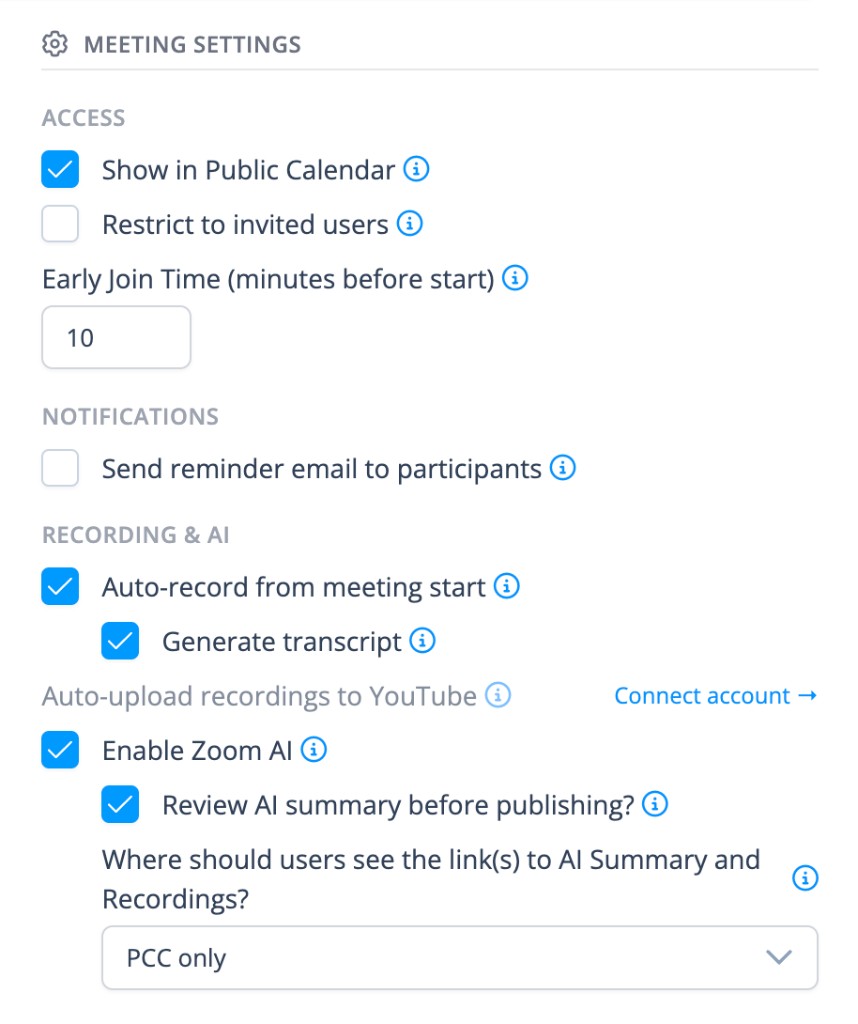
- Hosts must set Meeting Settings as follows (Send reminder email to participants is optional):
- Show in Public Calendar — on, so the meeting appears on the FINOS Community Calendar
- Restrict to invited users — off
- Early Join Time (minutes before start) —
10 - Send reminder email to participants — optional
- Auto-record from meeting start — on
- Generate transcript — on
- Auto-upload recordings to YouTube — off
- Enable Zoom AI — on
- Review AI summary before publishing? — on
- Where should users see the link(s) to AI Summary and Recordings? — PCC only
Prepare and circulate an agenda
- Before each meeting, hosts must create a GitHub issue listing the topics to be discussed and decisions to be made, and circulate that issue via the group's preferred communication channel.
- Use the meeting minutes template. See Meeting Minutes for the GitHub workflow.
- Do not use the GitHub issue to record attendance.
Keep minutes
- Hosts must keep minutes of meetings, capturing:
- For each agenda item:
- A brief summary of the matter discussed (one sentence is often enough).
- Any significant positions/proposals put forward (one sentence each is often enough).
- A record of any decisions made or actions taken, including a record of the vote (i.e. votes in favor, votes against, and abstentions).
- Any action items assigned, including the assignee and the deadline (if any).
- For each agenda item:
- Minutes must not attribute any statement to an individual or organization without their express prior approval. This is to ensure that people feel free to speak candidly.
- Minutes should be concise records of the important parts of the meeting. They should not be an exhaustive transcript. (See this example.)
- LFX PCC produces a Zoom AI summary automatically. Hosts should use that summary to capture minutes. Before publishing, hosts must anonymize it: remove names and any other details that would attribute a statement to an individual or organization without their express prior approval. Then publish the summary in PCC. An unpublished summary is not a minutes record.
- Hosts must post a public link to meeting minutes after the meeting. The GitHub agenda issue is that public record. Once the AI summary is published, add the summary URL to the issue. Viewing the summary in PCC requires an LF login; the GitHub issue remains the link anyone can open.
Run the meeting
- Hosts must ensure that the meeting adheres to the LF Antitrust Policy.
- Hosts must ensure the FINOS Code of Conduct is adhered to at all times and remove anyone from the call who does not adhere to it.
- Hosts should display the Antitrust Policy summary slide at the beginning of the meeting.
- Standards project hosts should display the standards project compliance slides at the beginning of the meeting.
- Hosts should ask new participants to identify themselves with a quick introduction and their affiliations. If an attendee is not able to be identified they should be removed.
- Hosts should run the meeting according to the following best practices:
- Ensure a good audio connection. Laptop audio is often worse than a phone call.
- Minimize background noise. Mute yourself and (if necessary) other participants when you or they are not speaking.
- Join and claim host before the call is scheduled to start.
- Start the meeting 5 minutes after the scheduled start to give people time to join.
- Keep the meeting to the agenda. Move off-topic discussions to the agenda for the next meeting, or the mailing list.
- If a discussion becomes unproductive, move on. Ask the participants to send their proposals via issues/pull requests, on the mailing list or as agenda items for future meetings.
- End the meeting on time, even if you don't get through the agenda, so those with other appointments do not miss important discussions.
- If a host cannot attend a call and there is no backup host available, the call must be cancelled with at least 24 hours notice and the community notified via its preferred communication channel. Cancel the occurrence in PCC; if you do not yet have PCC access, email help@finos.org.
Call votes as needed
Hosts should call a vote on any agenda item requiring one, according to the voting procedures of the group.
Host the Zoom meeting
Hosts should claim the host role after joining so they can manage participants, waiting room, and screen sharing. Get the host key from PCC or from My Meetings and follow Find your host key. The host key is available starting one hour before the call.
After claiming host, FINOS highly recommends enabling the waiting room and disabling participant screen sharing:
- Click the Host tools icon in the Zoom toolbar and toggle on Enable Waiting Room.
- Click Host tools again and, under Allow All Participants To, toggle off Screen Share.